
Sick and tired of the frustration
The BEST Way To Create A Website For Your Small Business - In 4 Steps
Let’s dive right in.
Here’s the thing. Websites that are well designed and planned can have up to 200% more conversions than a poorly strategized website.
(Psst – Websites with an excellent, out of this world user experience can have up to 400% more conversions than ones that are thrown together).
Meaning, if you’re thinking you can just throw a website together yourself, well… sure you can. (but should you?)
I’ve heard it all before:
“Who needs a developer when you can just build your own website on Wix, Squarespace, WordPress, Shopify?”
“AI can build me a website, why would I hire someone?”
“Why are developers so expensive?”
The reality is, a good website with solid strategy is worth it’s weight in gold. 🪙 If you have all the other pieces to the puzzle (marketing, a solid business plan, and offers ready to go), a good, well-planned website will get you a huge, long-lasting ROI.
So yes – website developers and agencies are expensive. It’s because there is SO much that goes into a conversion-ready website beyond the drag and drop.

In this article, you’re going to learn all the steps it takes to make a website. But not just any ‘ol website – we’re going to set you up with the BEST way to create your small business website.
Does any of this sound like you?
“I don’t want to spend all my time on my working on my website”
“ I need to figure out the content before I can start.”
“Everything is a placeholder.”
“I want something functional, easy to use, pleasing to the eye, and catchy…
A beautiful website with a smooth UI design that has an optimized SEO…
A user friendly experience for my clients with good infrastructure.”
Don’t worry – I’ve got your back. I am going to walk you through the best way to create and design a website for a small business – one that speaks to your dream clients, and gets them to convert into paying customers.
Stick with me, because you won’t need any other tutorial after this.

Grab Your Freebie: The Website Launch & Optimization Checklist
Don’t Fly By The Seat Of Your Pants – Why You Need A Website Strategy
“How hard can it be?” This is what I said when I first decided to work for myself. I had spent years teaching myself a highly-profitable skill – coding – and I was more personable and caring than those tech bros I was working with.

4 months later, I realized I had spent months working 50 hours a week for myself with no plan.
My only clients at that point had been friends (or friends of friends) who were paying me way below what I was worth.
That’s when I realized – I actually *don’t* know anything about how to start and build a business. So I went out to look for coaches and mentors to guide me in the right direction.
This was definitely the Dunning Kruger effect (which I also experienced HARD when I was learning how to code.)
The Dunning Kruger effect is when people who don’t know much about a subject tend to overestimate how much they know, or their abilities in that field. It’s the whole “That’s all it takes? I could do that!” – and the person actually believes this because they’ve never tried it before.
At the same time, people who are competent at the skill may underestimate themselves (think, imposter syndrome).
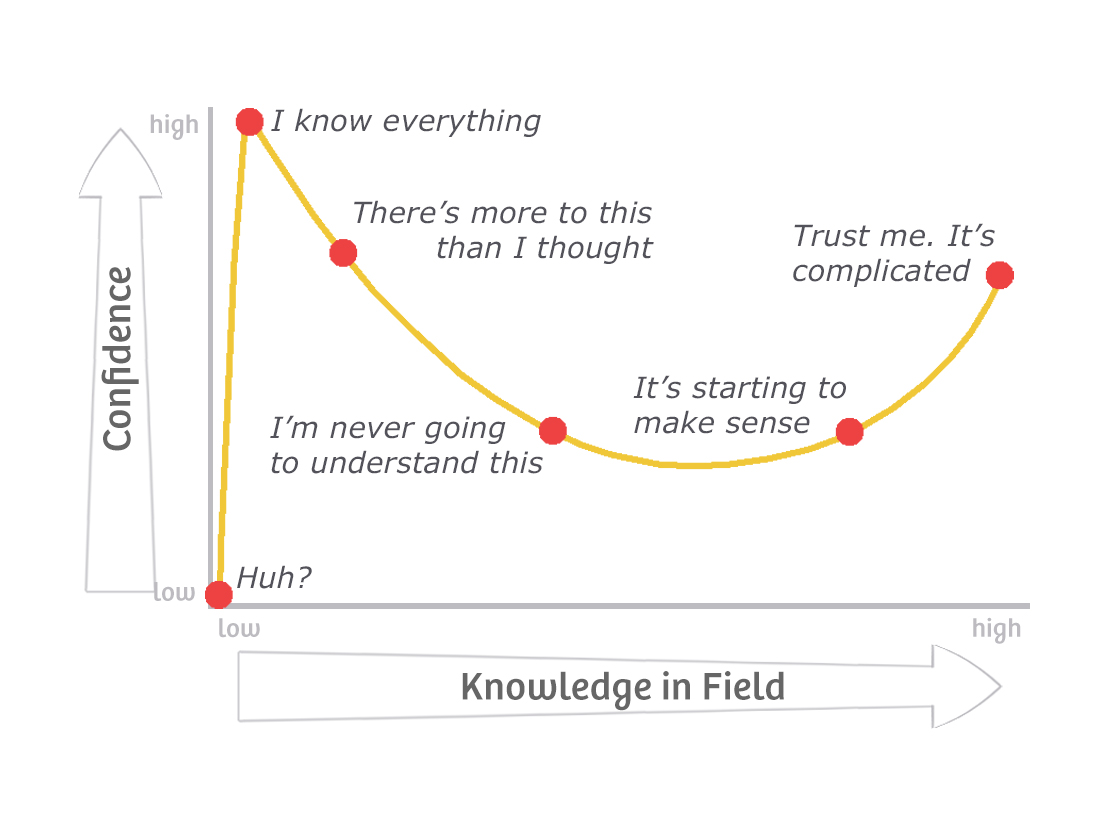
Graph from agilecoffee.com
A LOT of my clients are people who had this experience – “how hard can it be? I can build my own website.” Then they realize either that:
1 – It is causing them immense frustration
2 – They don’t know what they are doing wrong or how to fix it
3 – It was a bigger task than they expected, and they fear they need to tear it down and start over, but don’t want to.
The greatest enemy of knowledge is not ignorance, it is the illusion of knowledge.
Daniel Boorstin
It’s painful to realize you’ve put in so much work, and aren’t going down the right path. That’s why I’m here to set you up for success.
Many of my Vision to Launch students came to me because they knew they needed a website and wanted to take on that aspect of their businesses. Some of them had started to build without realizing how hard it was going to be. Some already knew it would be hard and wanted to do it with guidance.
So, you might be looking at your computer thinking “I could build a website like that. How hard can it be?”
Well, my friend, it’s easy to drag and drop. But there’s more to it if you want to build a website that is going to bring you business.
How Long Does It Take To Build A Website?
Now that you know why we are doing things this way, you may realize:
Building a website the in best way is a big task – one that cannot be effectively completed over the course of a weekend.
How long does it take to build a website, then?
Every website has a different amount of pages, complexity, and prep. This Forbes article estimates that it should take 10-14 weeks from planning to completion (or, From Vision to Launch 😉). At Nikkster.tech, we’ve been able to streamline our processes and systems – now we can build a website in roughly 4-6 weeks on our end. (It takes longer if we are waiting on assets from our clients, like photos or content to be created.)
For the rest of this article, I’m going to walk you through our process of working with clients. We’ve found that this is the best way to build a website for a small business. It covers all the bases and sets them up for success in the long run.
Start With The Foundations: Your Business, Your Brand, Your Target Audience
Before you pick a website builder or a template, you need to know your brand. Your brand isn’t just fonts and colors you like, or a logo you threw together in Canva. It’s how you talk to people, how you present yourself, what your business stands for.
If you have worked with a brand designer, you probably already have a brand kit. Which means – you’ve already got all these in a neat & tidy package. Woo, ahead of the game!
Beyond how you want to present yourself, it’s also important to know what your target audience wants/needs that you can provide.
A lot of people recommend doing a client avatar exercise, but I don’t. For this, I recommend going out there and asking people in your target demographic. Ask them directly! (Don’t try to pitch them – just ask them what they want/need and what holds them back.)
This is going to help you with your messaging and website copy. Without it, you’re writing copy based on clients you made up in your head.

The Nikkster.tech messaging in March 2024 – before I knew what my target audience wanted.

The Nikkster.tech messaging in March 2025 – after I had surveyed and interviewed my target audience.
(Psst – new businesses – it may not be in your best interest to invest in a website just yet. If you’re just starting out, you likely don’t have enough information to build a solid website, nor do you need one. That’s right, I said it. Check out our New Business Website Roadmap (“Build It Better”) to find out what’s best for you at your stage of business.)
Alright, story time: In 2024 I was approached by a small business who was struggling to get customers from their website.
They had repeat customers who absolutely loved their products, but they were struggling to gain new customers. My team and I quickly realized that their messaging was not portraying the level of quality of their products AND – they were completely ignoring two key groups who would LOVE their products.
Their messaging was off. Because of this disconnect, the client really struggled to bring in new customers. Anyone they were able to grab stayed for the long haul, but getting them to put down their credit card for the first time was a real challenge.
So we got to work creating new messaging, redesigning their website, and providing guidelines on updated imagery. We created a new user journey for these new groups, and displayed their information in a way that would be better received.
In October of that year, they launched their new website along with a holiday advent calendar.
The Advent calendar sold out by the mid-November.
Since launch, they have consistently been making $20,000 a month more in sales than they were with their previous website.

Clearer messaging on this website (launched in Oct 2024) led to an increase in website conversions and sales.
Plan out your website (Blueprints, Templates, Sitemaps..)
Once you know your brand, your messaging, and what you’re going to offer (based on what people want/need), it’s time to start planning your website.
Just like any successful, long-lasting project, we start with the foundations.
So many of my clients have come to me because they spent months DIYing their websites, only to realize:
Their websites were confusing not only for their clients, but for them as well.
Building a website with no real foundations can hurt your business. Many of them found that people were emailing to ask for information because they couldn’t find it on the website – they got lost.
I came in, took what they had, built a solid foundation with a solid user journey, and restructured their websites. Now they get less emails and their websites do a lot of work for them, before people land in their inboxes.
All that being said: the best way to create a website for your small business is to start with a solid foundation.
Ok, so, before you rush off to find a gorgeous template, we need to figure out a user journey for your target audience. How are you going to guide them to where you want them to go? How are you going to organize all the information on your website?
Also, where DO you want them to go? What is the goal for each page? What should they do?
You don’t want them to get lost on your website, and as a result, become too frustrated to work with you. So you need to guide them.
Another thing to look at here – what software will you need to use for your website? Do you want people to be able to book appointments with you? Do you want them to be able to buy something? Should they be able to sign up for a class?
Figure out what you want them to do, then find out what software you need to use on your website. (Don’t stress out too much about this – you likely already use something that will work, and can upgrade when it’s time).
Once you’ve planned that all out, go off and have some fun. Find a template that you like best, that is going to represent your business (based on your branding) and your industry best.
But wait – before you go looking for a template, you’ve gotta figure out which website builder is best for you.
This is a HUGE step.
I get clients ALL THE TIME who have spent months building a website on one platform, only to realize they need to be on platform Y to do what they need to do.
Websites don’t transfer from platform to platform for the most part. You’ve gotta start over.
So, make sure you know which platform is going to be best for you. (Take our quiz so you don’t have to do a deep dive).
Ok, back to templates.
You’re looking for good bones here. The fonts, colors, and imagery will change, as will the structure. Why?
Because templates aren’t built with YOUR goals in mind.
They aren’t built for your target audience, for your business, for your brand.
So we’re going to reorganize your template to make it work for you.
Create and Gather Your Website Assets
If you’ve already had branding photography done, or maybe you’ve got headshots/video footage you, you can totally use that for your website. And you should!
You need imagery that speaks to your target audience, shows off what you do, and speaks to your brand.
Be wary of stock photos. Use them sparingly – people can tell when your website is all stock footage.
At this point, you’re also going to write your website copy (if you don’t have it yet.)
The biggest thing I will say here is: your website copy needs to speak to your target audience. What do they need to hear to trust you and want to work with you?
There are so many guides on how to write good website copy, and I’ll be writing a blog about that soon.
At this stage, you also need to create or gather any lead magnets or funnels you’ve created and then get them all set up. Get ready to connect them to your website (you should have figured out how they will be connected in the previous section. If not, go back and reorganize!)
Oh – also, if you haven’t yet: go buy your domain name. (I’m not being paid to say this, but my go to is namecheap – they have been great and their prices are reasonable.)
Build! Test, Launch, Refine
FINALLY! It’s time to build!

See how long that took? See how much effort went into the planning processes? THIS is what they don’t teach in other tutorials, and it frustrates me so.
If you want to create a website for your business and do it RIGHT (so that it’s a tool not a burden), you need to do a lot of upfront prep work.
So, go set up your website builder (here’s that quiz again if you haven’t taken it yet), get your domain connected, install your template, and start to build. (Don’t forget to build for mobile, too!)
Make sure everything is in working order. There are common mistakes I see ALL THE TIME from people who DIYed their websites – watch the video and make sure you fix ‘em on your site!
Also – this is a GREAT time to use our Website Optimization & Launch Checklist 👇
Grab Your Freebie: The Website Launch & Optimization Checklist
Finally – you’re going to want to test things. Test them everywhere. Ask your friends with different operating systems (mac vs pc, android vs iPhone) to check out your website on their devices. Click all the links. Check for broken images. Optimize your website for faster loading times.
Once you launch, you’ll need to continually keep up with your website. A website is a live thing – it needs to be updated and rethought at times – but if you went through all these steps you’re way ahead of the game.
Woo! That was a lot! If you made it this far, awesome job! You get a star 🌟
In summary, you learned:
- The best way to start a website for your small business
- Why you need to create a plan/foundations
- How to gather and organize all the pieces of the puzzle (your brand, your offers, what your target audience wants)
- How to lay out the foundations of your website (what is your goal for each page? How will users get your dream clients to do what you want them to do? How will you organize everything? What software are you connecting to your website?
- Why you need to pick the RIGHT website builder instead of just picking one at random.
- The things to look for in a template for your website.
- What to do before launch and after launch to make sure your website is a success.
That was a lot. But, as long as you have some guidance, you CAN build a website like the professionals do and update it as time goes on.
Your website CAN convert dream clients and make them trust you, and you CAN build it yourself.
If you want to dive even DEEPER into all of this (and have my guidance as you build our your website) I invite you to join us in our flagship course, From Vision To Launch.
We go through each of these steps, but in WAY more detail. You’ll have worksheets to break everything down into easy steps, and use them to build a website that you’ll be in charge of.
Skip the months of tinkering and the thousands of dollars you’ll spend down the line on developers. This is your chance to take the reins and learn how to be in charge of your own website.
Ditch the frustration.
Get dream clients in your inbox.
Become A Student of Vision To Launch
Build a professional website without adding “web designer” to your resume.
Now you know the best way to create a website for your small business, but what about how to refine it as time goes on?
Coming soon – I’ll be walking you through how to figure out EXACTLY what needs to be updated on your website to get people to the goal post.
Want to save this for later? Click below to Pin it!

When you’re ready,
Here are a few ways I can help
1 – Our Newsletter 📫 get bite-sized website tips delivered straight to your inbox! Every Monday & Wednesday (plus some extras – goodies, freebies, products, and info about sales or launches – you’ll be in the loop). → Stay in the loop
2 – Looking to learn how to build, maintain, and strategically update your business’s website, and knock out those developer costs FOR GOOD? 🏆 Have we got the course for you! Grab your seat and get access for life → Get Inside Vision to Launch
3 – Want to learn (or get up to date with) SEO for your business? 🌐 We’ve got a mini-course for you — It’s yours for life, so use it over and over again. (Don’t worry – SEO is always changing, and this course updates with it). → Join the Course
4 – Grab our resources and get your website in tip top shape on your own time. 📚 We’ve got templates, worksheets, and more. → Browse our shop
5 – Do you own/run a small business and are looking for a top-notch website expert who will feel like a star member of your team? ⭐ You’ve found the real deal, let’s get to work → Bring our expertise to your business